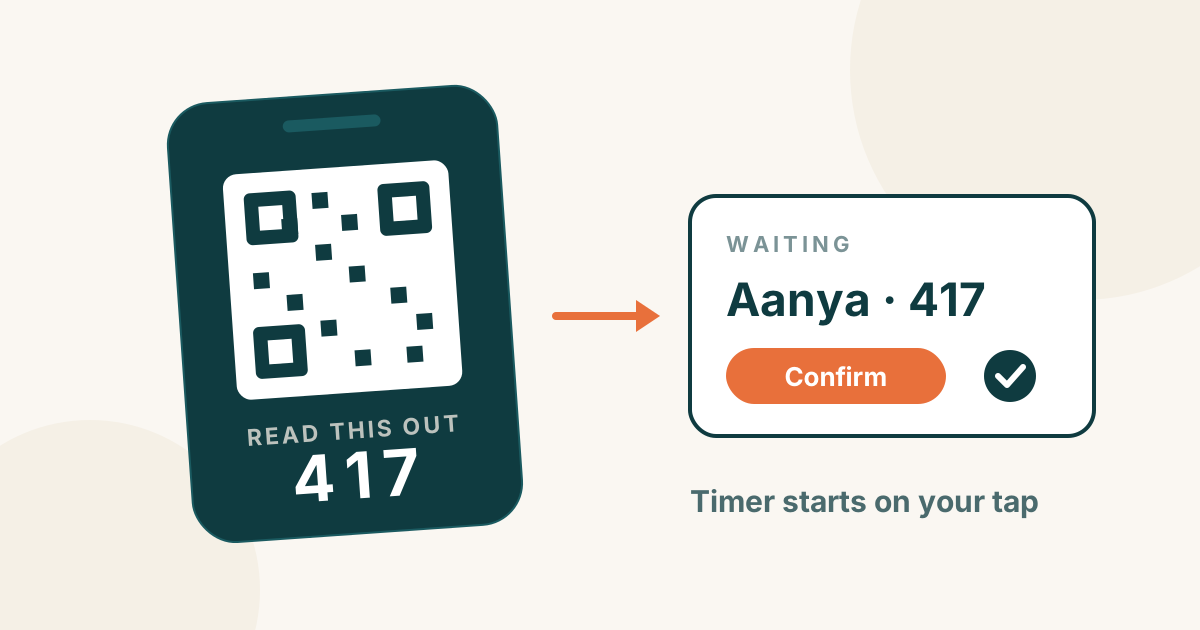
A digital waiver is a consent form the parent signs on their own phone before their child plays. The best place for it is inside the check-in form: the parent scans a code at your door, enters their details, ticks the waiver once, and your desk confirms. Returning families should not sign again. It should cost you nothing extra.
This guide explains what goes into a soft-play waiver, how the digital version works, the cases that trip centres up, and what different software charges for it.
What a soft-play waiver usually covers
Your waiver is your own document. Write it with a local lawyer — rules differ by country and state. Most play centres include:
- Supervision rules. Who must stay with the child, and from what age a child may play alone.
- Health and risk. The parent confirms the child is fit to play and accepts the normal risks of active play.
- House rules. Socks, no food on the play frame, height or age zones.
- Photos. Whether the parent agrees to photos or videos of their child. Give a clear yes or no.
- Who signed, and when. The parent's name, phone and the time of signing, kept with the visit.
Paper or digital?
Paper forms work, but they slow the busiest hour. A parent has to find a pen, read the form at the counter, and write their details while three families wait. Then someone has to file the paper and find it again if anything happens.
A digital waiver moves that work to the parent's phone, before they reach the desk. The record is saved with the visit, so you can find who signed, when, and for which children.
How it works with QR check-in
- One printed code at your door. It never changes.
- The parent scans it and fills in their name, phone, the children's names and the package.
- The waiver is part of the same form. The parent reads it and ticks to accept. Photo consent is a separate yes or no.
- The desk confirms. Staff check the children are really there, take payment as usual, and the timer starts on that tap.
- The parent watches the timer on their own phone, and can extend from there.
At a play centre we work with, this is how most families now come in:
96%of check-ins filled in by parents themselves89%signed the waiver on their own phoneThe rest were helped by staff — which brings us to the cases that matter.
The cases that trip centres up
Returning families. A parent who signed last week should not have to sign again. In PlayOps you can choose this: a family who already signed your current waiver is not asked again at the desk. If you change the wording of your waiver, everyone signs the new version once.
A nanny or driver brings the child. They may not have a smartphone, or may not be the parent. Staff can fill the same form on the centre's phone and mark it as staff-assisted, so you always know who signed.
Parties and school groups. One adult brings twenty children. A group waiver on the booking covers the group, so the party does not queue at the door.
"Sign before you pay." Owners often ask for this. With the waiver inside the check-in form, the parent has accepted it before they reach the counter.
The waiver never blocks entry by surprise. If a parent skips it, your staff see that at the desk and decide what to do, instead of the system turning a family away.
What it costs with different software
| Software | Digital waiver (October 2026) |
|---|---|
| Bookeo | Add-on, from $9/month (pricing) |
| Checkfront | Included in $99/month + 3% of online bookings (pricing) |
| wakesys | Included; first 12 months free, then a share of takings (site) |
| ROLLER | Listed on its plans; prices not published (pricing) |
| Parafait | Included in a quoted system (site) |
| PlayOps | Included with QR check-in on the Growth plan, ₹3,999 a month |
When you compare, ask three questions. Is the waiver included or extra? Does a returning family sign again every visit? Can staff sign for a parent without a phone?
What PlayOps does and does not do
PlayOps puts your waiver inside QR check-in (on the Growth plan), keeps the record with each visit, and can skip the waiver for families who already signed your current version. It does not write your waiver for you — the wording is yours. It does not take payments itself; you keep your own UPI, card machine or cash. And it needs an internet connection. Read more about QR check-in and the parent's live timer, or see how it compares with other tools in our play area software comparison.
What to do tomorrow
- Read your current paper form. Mark what is a rule, what is consent, and what is the photo question. Keep them separate.
- Ask a local lawyer to check the wording once.
- Print one QR code for your door and test check-in yourself, as a parent.
- Try it free for a month on your own floor: start here.